
Market Share: Parameter Configuration Guide
This guide explains how to configure the Market Share Analysis skill, including dimension hierarchy usage and key configuration parameters.
Dimension Hierarchy
The dimension hierarchy defines the relationships between dimensions in your dataset and is fundamental to how the market share skill operates. This is the only configuration required to run MSA out of the box and admin users can configure it via the dataset's misc_info under the dimension_hierarchy key. It is defined as a JSON structure with the following properties:
| Property | Description |
|---|---|
name | Display name for the dimension |
col | Column name in the dataset |
exclude_in_mkt_size | When true, this dimension is excluded from market size calculations. Children of this dimension can be considered subjects. Only set at the top level. |
children | Array of child dimensions in the hierarchy |
Example Dimension Hierarchy
{
  "dimension_hierarchy": [
    {
      "name": "Manufacturer",
      "col": "manufacturer",
      "exclude_in_mkt_size": true,
      "children": [
        {
          "name": "Brand",
          "col": "brand",
          "children": [
            {
              "name": "Base Size",
              "col": "base_size",
              "children": []
            }
          ]
        }
      ]
    },
    {
      "name": "Segment",
      "col": "segment",
      "children": []
    },
    {
      "name": "Category",
      "col": "category",
      "children": [
        {
          "name": "Sub Category",
          "col": "sub_category",
          "children": []
        }
      ]
    },
    {
      "name": "State",
      "col": "state_name",
      "children": []
    }
  ]
}
How the Market Share Skill Uses the Dimension Hierarchy
-
Determine Breakout Structure: Dimensions are classified as either:
- Owner dimensions: Dimensions where
exclude_in_mkt_size: true. These are analyzed for share within the market (e.g., Manufacturer, Brand).- At least one subject (a filter who's dimension is in this hierarchy) is required to run MSA. The share of this subject will be shown in the first tab of the analysis.
- Non-owner dimensions Dimensions where
exclude_in_mkt_sizeisfalseor not set.
- Owner dimensions: Dimensions where
-
Navigate Breakout Levels: The
childrenarray enables drill-down analysis by identifying the next level of detail (e.g., drilling from Manufacturer to Brand) -
Determines Out of the Box MSA Configuration: The dimension hierarchy is the only configuration required to run MSA.
Parameter Summary
| Parameter | Type | Description |
|---|---|---|
global_view | JSON array | Breakout dimensions for overall market analysis |
market_view | JSON array | Breakout dimensions for specific market segment |
include_drivers | Boolean | Enable driver metric calculations |
subject_metric_config | JSON object | Metrics displayed in subject analysis table (first tab) |
decomposition_display_config | JSON object | Metrics displayed in market breakdown table (remaining tabs) |
market_cols | JSON array | Columns that define market filters |
impact_cols | JSON object | Custom impact calculation formulas |
View Configuration
The skill supports two view modes that control which breakout dimensions are used for analysis, which show the tabs in the output. Both global_view and market_view share the same structure.
Breakout Object Structure
Each breakout in the view array is an object with the following properties:
| Property | Required | Description |
|---|---|---|
dim | Yes | The column name of the dimension to break out by |
type | No | Either "share" (percentage of market) or "contribution" (contribution to total). If omitted, determined automatically from the dimension hierarchy. |
tab_label | No | Custom display label for the breakout tab in the UI |
drilldown | No | Nested breakout object for hierarchical drill-down analysis |
Drilldowns
The drilldown property allows you to define nested breakout levels, enabling hierarchical analysis.
Structure:
{
  "dim": "parent_dimension",
  "type": "share",
  "tab_label": "By Parent",
  "drilldown": {
    "dim": "child_dimension",
    "type": "share",
    "tab_label": "By Child",
    "drilldown": {
      "dim": "grandchild_dimension",
      "type": "share"
    }
  }
}
Behavior:
- The
tab_labelfrom a parent breakout is passed down to its drilldowns - If a drilldown's dimension matches the subject dimension, the skill automatically adjusts the breakout hierarchy
Default Behavior
If global_view and market_view are not provided (empty strings), the skill automatically determines breakout dimensions from the dimension hierarchy. This allows the skill to dynamically select appropriate breakout levels based on the dataset's structure.
global_view
Type: JSON array of breakout objects
Defines the breakout dimensions used when analyzing the overall market, ie no specific market filters applied OR more than one market filter is applied.
Example
[
    {
        "dim": "sub_category",
        "type": "share",
        "tab_label": "Sub Category"
    },
    {
        "dim": "state_name",
        "type": "share",
        "tab_label": "State"
    }
]
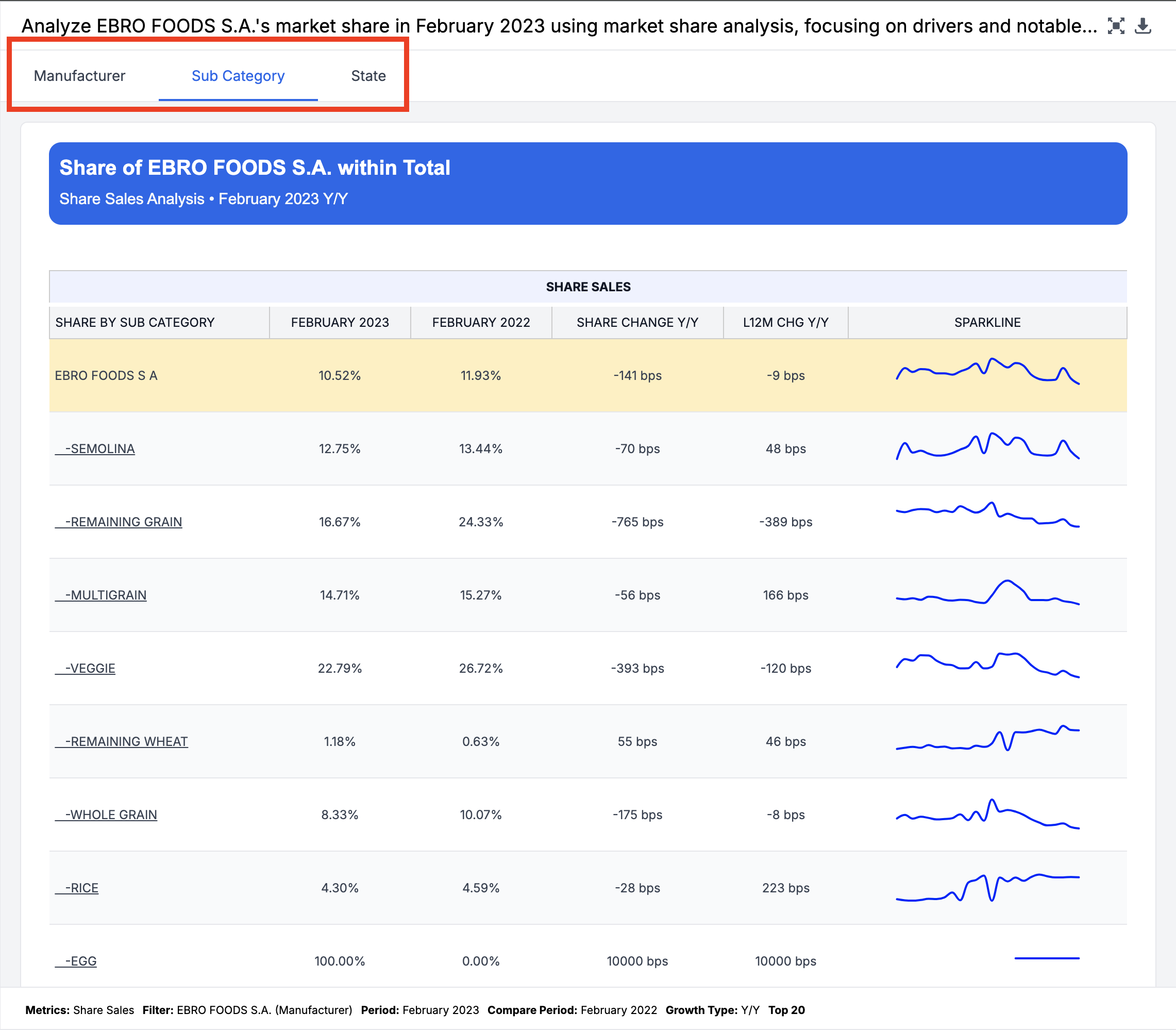
Which would produce the following tabs when asking about the subject EBRO FOODS S.A. (Manufacturer). The first tab focused on the subject filter and at what level it is within the dimension hierarchy. The remaining tabs are from the global_view because there aren't any market_cols filters applied.
market_view
Type: JSON array of breakout objects
Defines the breakout dimensions used when analyzing a specific market segment (exactly one market filter applied).
Example
[
    {
        "dim": "brand",
        "type": "contribution",
        "tab_label": "Portfolio",
        "drilldown":
        {
            "dim": "base_size",
            "type": "contribution"
        }
    },
    {
        "dim": "segment",
        "type": "share",
        "tab_label": "Segments"
    }
]
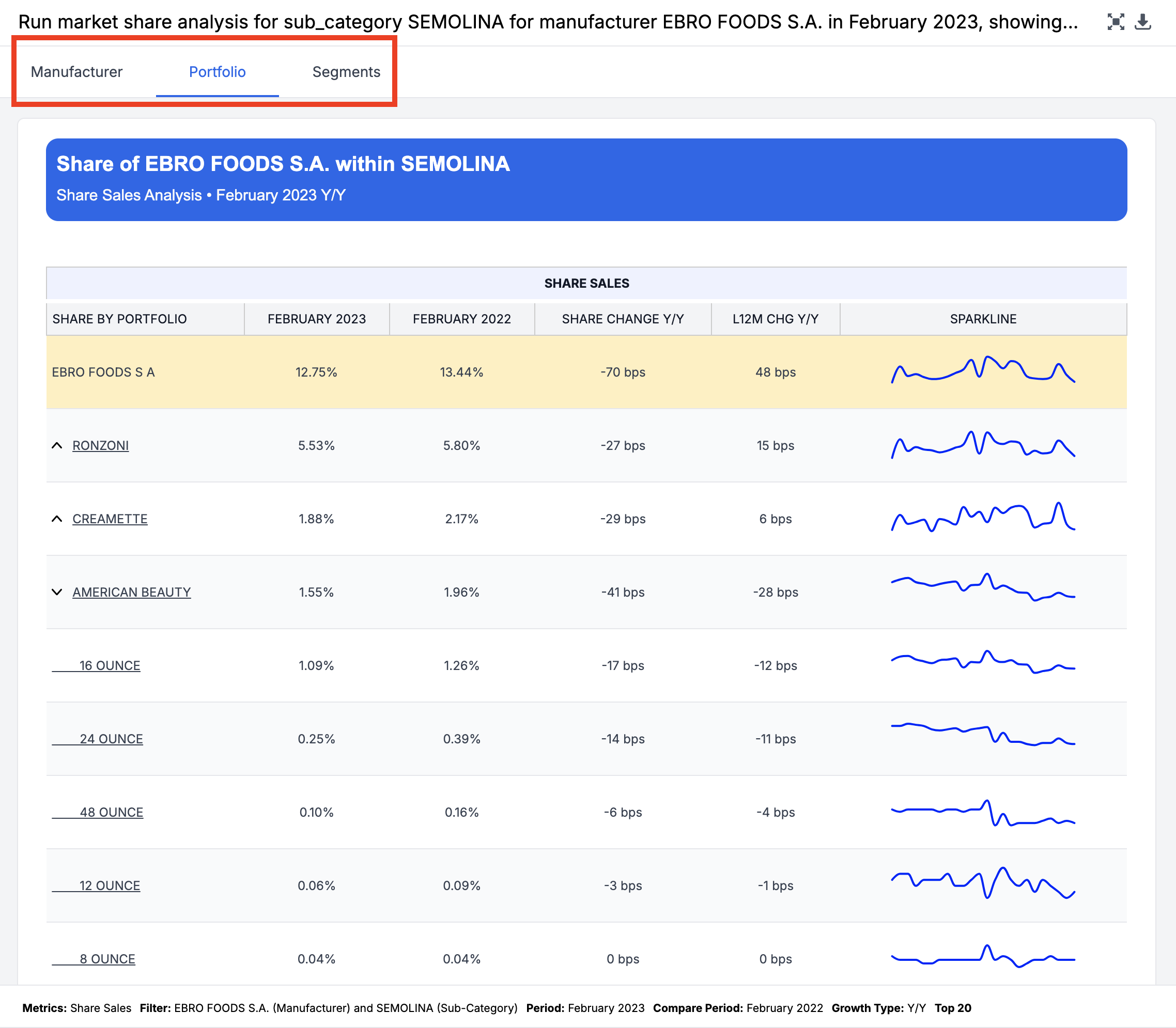
Which would produce the following tabs when asking about the subject EBRO FOODS S.A. (Manufacturer) and filtering to SEMOLINA (Sub-Category). The first tab focuses on the subject filter and at what level it is within the dimension hierarchy. The remaining tabs are from the market_view because there is a single filter dimension from the market_cols applied.
The base_size drilldown is shown for every brand in this view via a dropdown menu.
Driver Metrics Configuration
Driver metrics provide additional context about what's driving market share changes.
include_drivers
Type: Boolean
Default: True
Controls whether driver metrics are calculated and displayed.
Behavior
When True AND at least one of subject_metric_config or decomposition_display_config is provided:
- Driver metrics are calculated for the configured metrics
- Additional columns appear in output tables
- Impact calculations are performed (if configured)
When False OR no config objects are provided:
- All driver-related calculations are skipped
- Output tables show only basic share metrics
Metric Display Configuration
Two parameters control which metrics and display values appear in output tables: subject_metric_config and decomposition_display_config. Both share the same structure.
Structure
{
  "Section Name": {
    "metric_name": ["display_type", "display_type", ...]
  }
}- Section Name: Groups metrics under a labeled section in the output (e.g., "Metric Decomposition", "Performance Metrics")
- metric_name: The name of the metric to display (e.g., "sales", "volume", "acv")
- display_type: An array specifying which values to show for the metric
Display Types
| Type | Description | Column Suffix |
|---|---|---|
"current" | Current period value | _curr |
"prior" | Prior/comparison period value | _comp |
"pct_change" | Percentage change between periods | _pct_change |
"diff" | Absolute difference between periods | _diff |
"impact" | Custom impact calculation (decomposition only) | _impact |
subject_metric_config
Type: JSON object
Configures metrics displayed in the subject entity analysis table, which appears on the first tab of the output. This shows how the primary entity (the "subject" being analyzed) performs across the configured metrics.
Note: Does not support "impact" display type.
Example
{
    "Metric Relationship": {
        "sales": ["pct_change"],
        "volume": ["current", "pct_change"],
        "tdp": ["pct_change"]
    }
}
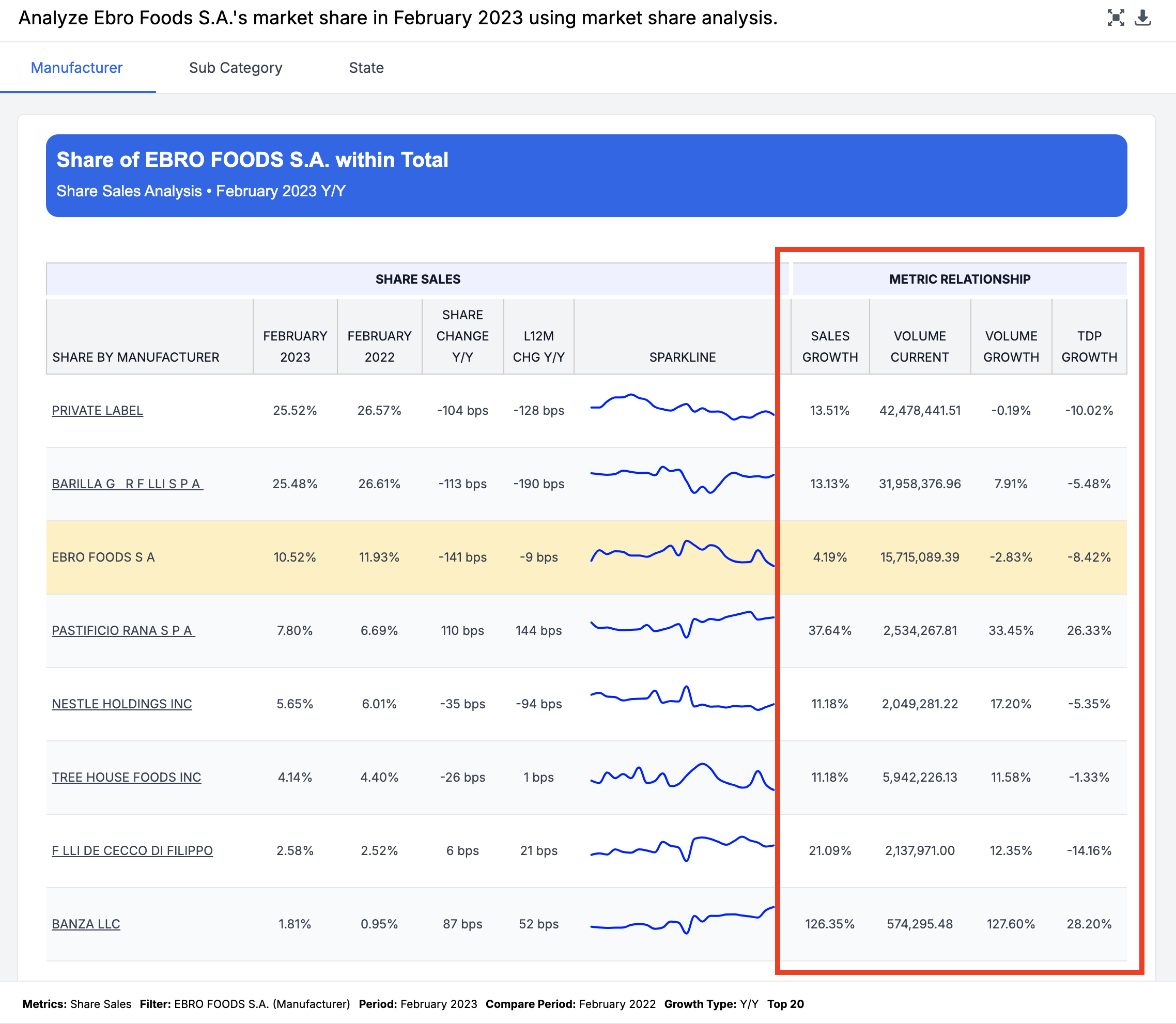
This configuration would add the following section to the first tab in the analysis.
decomposition_display_config
Type: JSON object
Configures metrics displayed in the market composition breakdown tables, which appear on the remaining tabs (breakout tabs) of the output. This shows how the overall market or segment breaks down across the configured metrics.
Note: Supports all display types including "impact".
Example
{
		"Impact on Share": {
        "sales_share": ["impact"],
        "volume_share": ["impact"]
    },
    "Metric Decomposition": {
        "sales": ["pct_change"],
        "volume": ["pct_change"],
        "tdp": ["pct_change"]
    }
}
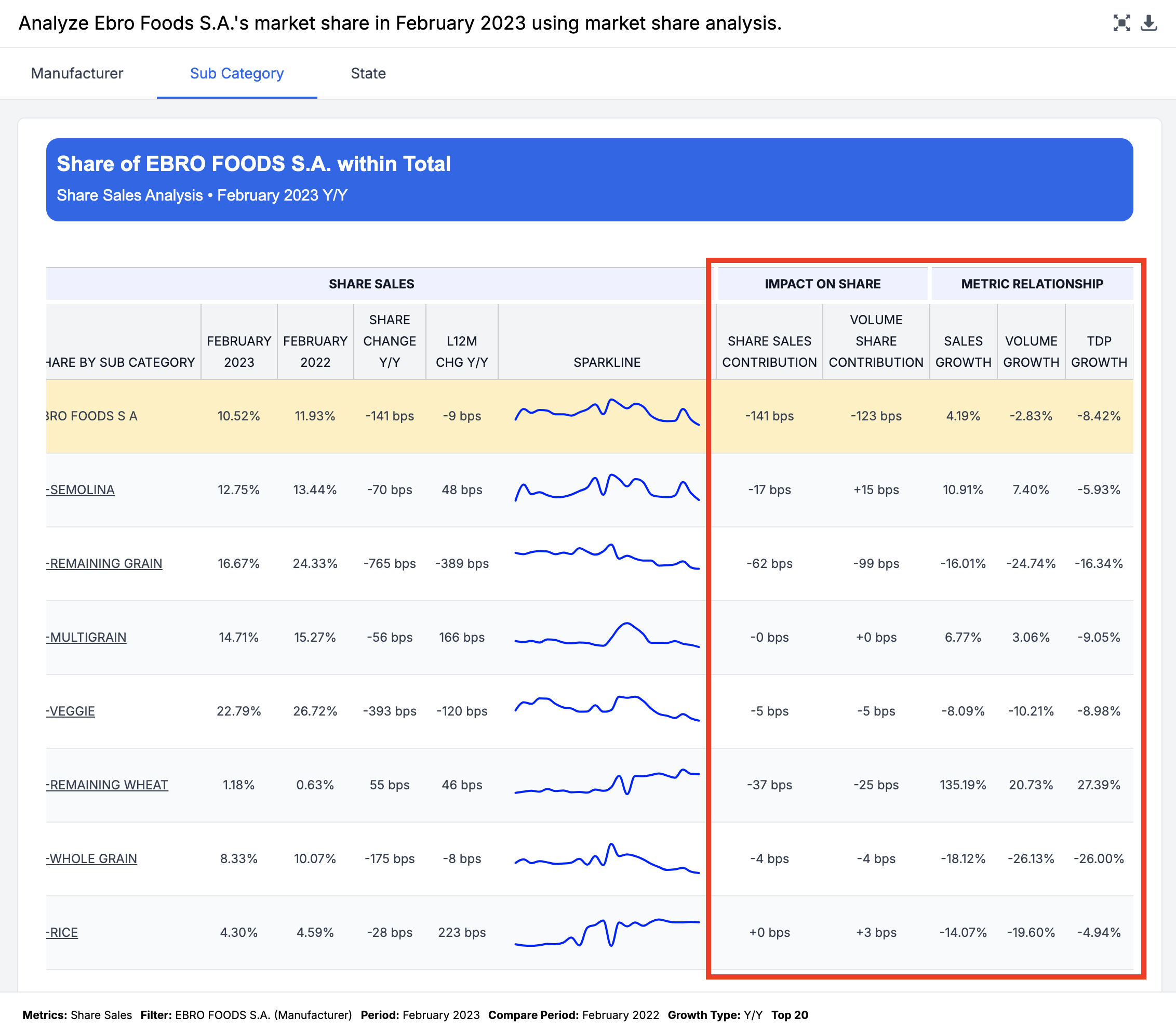
This configuration would introduce the following sections in the breakout tabs:
Comparison
| Parameter | Applies To | Tab Location | Supports Impact |
|---|---|---|---|
subject_metric_config | Subject entity metrics | First tab | No |
decomposition_display_config | Market breakdown metrics | Remaining tabs (breakouts) | Yes |
Market Filter Configuration
market_cols
Type: JSON array of strings
Specifies which columns should be treated as market-defining filters.
Purpose
This parameter determines:
- Which query filters are considered "market filters"
- Whether to use
global_viewormarket_view
Example
["sub_category", "state_name"]With this configuration if the user filters by exactly one of category or segment, the skill uses market_view otherwise, it uses global_view.
impact_cols
Type: JSON object
Defines custom formulas for calculating impact metrics.
Structure
{
  "metric_name": "formula_expression"
}
Available Formula Functions
| Function | Description | Example |
|---|---|---|
diff(metric) | Current minus prior value | diff(volume) |
current(metric) | Current period value | current(sales) |
prior(metric) | Prior period value | prior(volume) |
current_market(metric) | Market's current period value | current_market(sales) |
prior_market(metric) | Market's prior period value | prior_market(volume) |
Example
{
  "volume": "diff(volume) * prior(acv) / current_market(sales)",
  "distribution": "diff(acv) * prior(volume) / prior(acv)"
}
Requirements
- Metrics with impact formulas must be included in
decomposition_display_configwith"impact"in the display types - All metrics referenced in the formula must exist in the data
Updated 7 months ago